
Field Trials help
Nothing done from the signed-in tools destroys an event. A change can be undone, and the audit log records who made it.
Reading the calendar
- Open the Field Trials calendar. The list groups events by month.
- Use the filters for region, type, state, club, and year, then choose Apply.
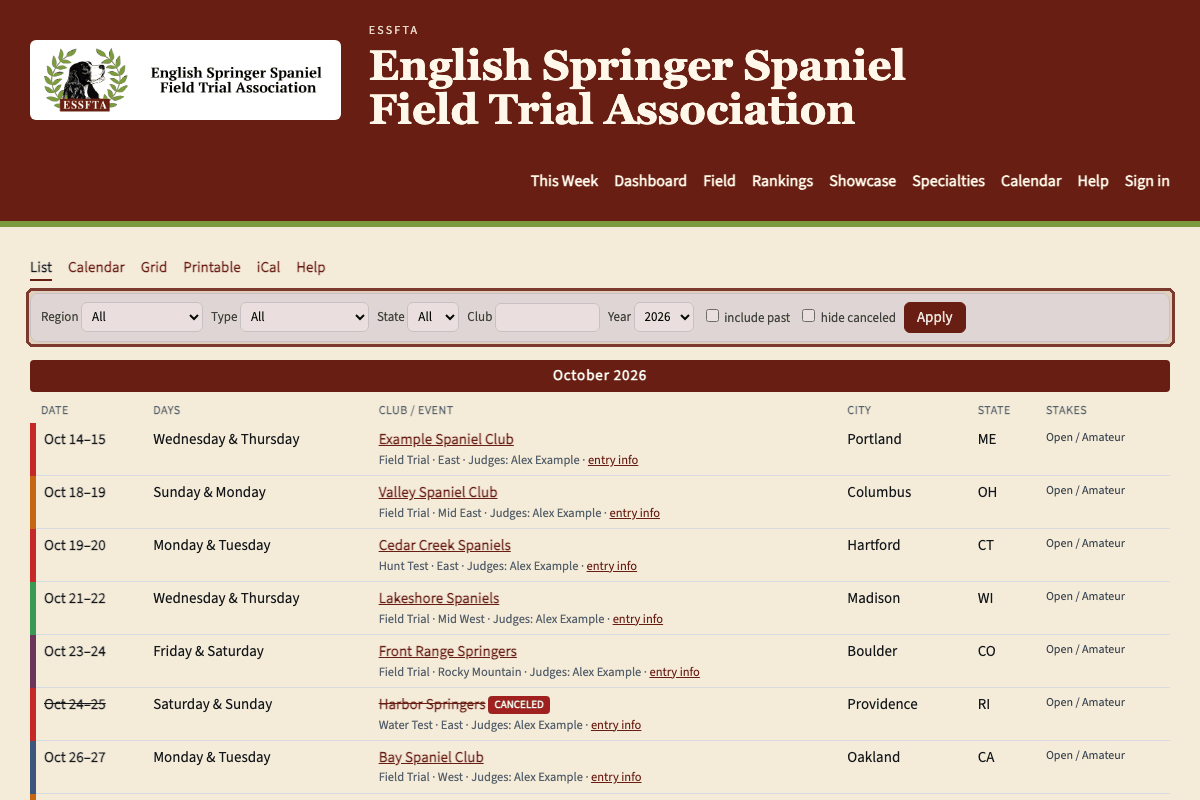
The calendar. Filter by region, type, state, club, and year, then choose Apply. - Choose Calendar for one month, or Grid for the regions from west to east. A national, and any event with no region and no mapped state, spans the whole grid.
- Choose Printable for a page you can print, or iCal to subscribe from a calendar app.
- Canceled events stay on the calendar, struck through. Tick "hide canceled" to leave them out. Hidden events are not on the public pages.
- The list starts at today. When past events are offered, tick "include past" and choose Apply. Signed-in people always get that choice. Visitors see it only while an admin leaves past events on.
- Open an event's name for the stakes, judges, fee, closing date, and entry link.
Questions, or something this page does not cover — email Albert.